
Mastering AVD Economics through MWM
FOCUS Aligned Strategic Framework to Optimize AVD ROI through Multi-Session Efficiency, Policy-Driven Tagging, and Scalable Cost Governance.
In a traditional VDI (Virtual Desktop Infrastructure) model, costs are often "set and forget" CapEx investments. Azure Virtual Desktop (AVD) shifts this to an OpEx, consumption-based model. While OpEx provides a level of flexibility, without guardrails and accountability it can quickly lead to budget overruns. FinOps-the practice of bringing financial accountability to the variable spend of cloud-is critical for AVD to ensure that "flexibility" doesn't turn into "overspending."
This report outlines the FinOps principles, best practices, and strategic advantages of AVD over traditional and alternative desktop solutions.
Core FinOps Principles for AVD
To successfully manage AVD costs, organizations must adopt the following FinOps Foundation principles tailored for desktop virtualization:
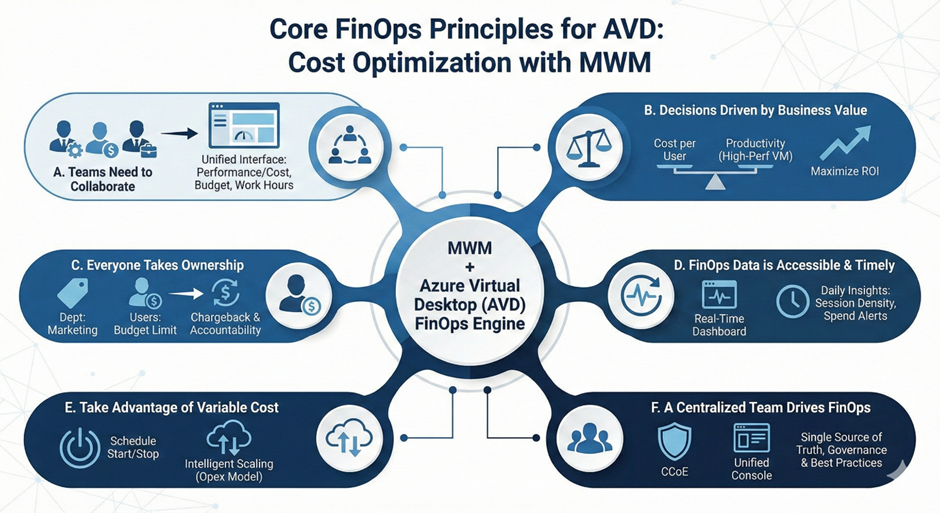
A. Teams Need to Collaborate
MWM speaks three languages: IT sets performance, Finance controls costs, and Business defines schedules-all in one unified platform.
B. Decisions are Driven by Business Value of Cloud
Instead of aiming for the lowest bill, aim for the lowest Cost per User. If a higher-performance VM SKU increases productivity by 10% but only costs 5% more, that is a positive FinOps decision. MWM allows for Granular Tiering of the VMs based on the Role. This provides the flexibility to the business to allocate cloud compute resources based on the business value.
C. Everyone Takes Ownership of Their Cloud Usage
Tagging host pools by department (e.g., Department: Marketing) allows business owners to see the direct cost of their remote workforce and encourages them to "log off" when not needed. MWM's automate FOCUS aligned policy enforcement provides granular view of the cost and the associated chargeback that fosters the culture of paying for what you use within the Organization.
D. FinOps Data Should Be Accessible and Timely
Use the Azure Virtual Desktop Insights dashboard to view session density and cost trends daily, rather than waiting for a monthly invoice. MWM tracks user sessions and VM power states in real-time providing instant anomaly alerts and real time budget alerts.
E. Take advantage of the variable cost model of the cloud
The underlying VMS for AVD follow the same Opex cost models of Azure VMS. The MWM offers schedule start / stop services for AVD to optimize for costs only when it is used and further optimization through Intelligent off-loading of resources during off-peak hours.
F. A Centralized Team Drives FinOps
As the Single source of truth for the Compute resources, MWM aids the CCoE in simplifying their cost optimization efforts.
AVD Related FinOps Domains & Capabilities
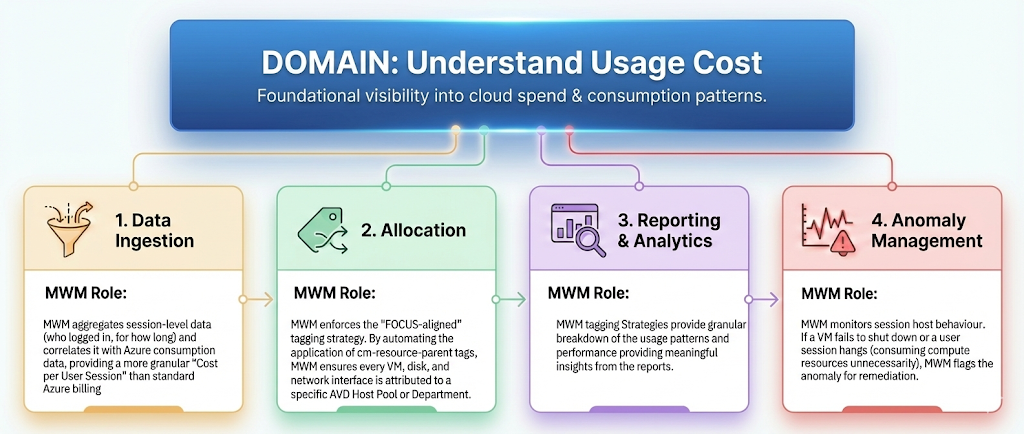
Domain: Understand Usage & Cost
Best Practices for AVD Cost Optimization
A. Compute Optimization
1. Multi-session Windows 10/11
This is AVD's "killer feature." Unlike standard Windows, multi-session allows multiple users to share a single VM, drastically reducing the cost-per-user compared to 1:1 ratios.
The FOCUS Role:
It provides a standardized schema (using columns like "AvailabilityZone", "ChargeCategory", and "EffectiveCost") that makes it easier to programmatically calculate Unit Economics, such as Cost per User Session.
2. Auto scale Scaling Plans
Implement native Azure Scaling Plans to shut down VMs during off-peak hours and start them only when the "Capacity Threshold" is met (e.g., start a new VM only when current ones are 80% full).
3. Start VM on Connect
Enable this feature to keep VMs deallocated (saving $0/hour) and only power them up when a user clicks "Connect" in their client.
B. Storage & Profile Optimization
1. FSLogix Exclusions
User profiles (VHDX files) grow indefinitely. Use redirections.xml to exclude temporary data (Teams cache, browser cache) from being saved to persistent storage.
2. Azure Files Tiers
Move rarely accessed profiles to "Cool" tiers and keep active host pools on "Premium" storage to balance performance with cost.
3. Disk Compaction
Regularly run scripts (or external tools) to "shrink" FSLogix disks that have "white space" from deleted files.
C. Strategic Purchasing
1. Azure Savings Plans vs. Reservations
Use Reserved Instances (RI) for 24/7 workloads (like "Always-On" jump boxes) and Azure Savings Plans for more dynamic, fluctuating host pools.
The FOCUS Role:
FOCUS automatically handles Amortized Costs (EffectiveCost column). It spreads that upfront reservation cost across every hour the AVD session hosts are running, giving you a true "loaded" cost of the service every day.
2. Azure Hybrid Benefit
If you already own Windows Server or Windows 10/11 licenses via M365, ensure you "check the box" for Hybrid Benefit to save up to 40% on the VM base rate.
D. FinOps Reporting & Tools
- Azure Advisor: Use the "Cost" tab to find underutilized session hosts.
- Tagging Strategy: Apply the cm-resource-parent tag to host pools. This allows Azure Cost Management to group all related costs (VM, Disk, NIC, IP) into a single "Host Pool" view automatically.
- Unit Economics Metric: Track "Cost per Desktop Hour."
- • Calculation: (Total Host Pool Cost) / (Total User Session Hours).
- • Goal: Decrease this over time by increasing session density.
Configuring "FOCUS-Aligned" Tagging for AVD
To achieve "FOCUS-ready" data, your tagging strategy must move beyond simple labels and align with the FOCUS schema attributes like ServiceCategory, SubAccountName, and ResourceName. This ensures that when you export your Azure bill to a FOCUS-formatted dataset, your AVD costs are instantly actionable without manual cleanup.
A. The Mandatory AVD Tagging Taxonomy
To comply with FOCUS 1.3 standards, apply the following tags to all Host Pools, Session Hosts (VMs), and Storage Accounts (Azure Files).
| Tag Key | FOCUS Mapping | Purpose | Example Value |
|---|---|---|---|
cm-resource-parent | x_ResourceParent | Critical: Automatically groups VM, Disk, and NIC costs under the Host Pool. | avd-hp-marketing-01 |
finops-env | x_Environment | Segregates Prod vs. Dev for FOCUS "Environment" filtering. | Production |
finops-dept | x_CostCenter | Maps directly to the FOCUS SubAccountName or CostCenter columns. | Marketing-US |
finops-service | ServiceCategory | Categorizes the spend as "Virtual Desktop" for cross-cloud benchmarking. | Desktop-VDI |
finops-owner | x_ResourceOwner | Identifies the technical lead for right-sizing accountability. | j.doe@company.com |
B. Implementation Strategy: Policy-as-Code
Manual tagging is a FinOps anti-pattern. To maintain FOCUS compliance, use Azure Policy to enforce these tags at the moment of creation.
1. The "Append" Policy:
Automatically add the cm-resource-parent tag to any session host VM being joined to a specific Host Pool. This ensures that even when Autoscale creates new VMs at 3:00 AM, they are correctly tagged for the morning's cost report.
2. The "Deny" Policy:
Block the creation of any new AVD Host Pool that does not have a valid finops-dept or finops-env tag. This "Guardrail" approach ensures 100% cost allocation from day one.
C. How FOCUS Processes AVD Tags
When you use the FOCUS dataset in Azure Cost Management, the system performs a "Data Cleanse" on your tags:
- JSON Normalization: FOCUS provides tags in a consistent JSON format, solving the old Enterprise Agreement (EA) issue where tags were often fragmented strings.
- Case Sensitivity: FOCUS 1.3 normalizes tag keys to a standard casing, preventing "CostCenter" and "costcenter" from appearing as two different departments in your VDI reports.
- Resource ID Mapping: Every tagged AVD resource is mapped to its ResourceId, allowing you to drill down from a high-level "Marketing Dept" cost in FOCUS directly to the specific underutilized VM in the Azure Portal.
By adopting FOCUS-aligned tagging and Multi-session density, MWM helps organizations to transform AVD from a "black box" expense into a transparent, high-value asset. Unlike Windows 365's fixed pricing or Citrix's complex on-prem overhead, MWM provides the granular "levers" necessary for a mature FinOps practice.